Introduction
If you've recently installed or updated a Drupal website and encountered the "Trusted Host Settings Not Set" warning, you're not alone. This is a common security warning that appears when Drupal detects that the trusted_host_patterns setting has not been configured in your settings.php file.
Although your website may continue to function normally, ignoring this warning is not recommended. The Trusted Host feature is an important security measure that helps protect your Drupal site from HTTP Host header attacks.
In this guide, you'll learn what the Trusted Host setting is, why it's important, and how to properly configure it to remove the warning and improve your site's security.
What Is the "Trusted Host Settings Not Set" Error?
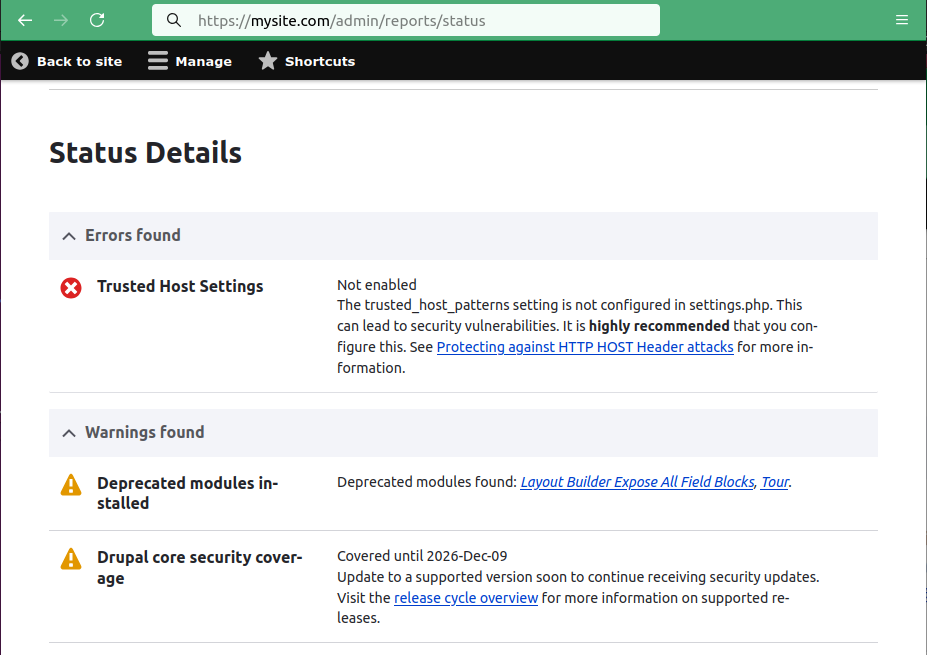
The warning usually appears on the Status Report page (/admin/reports/status) and looks similar to this:
Trusted Host Settings

Not enabled
The trusted_host_patterns setting is not configured in settings.php. This can lead to security vulnerabilities. It is highly recommended that you configure this. See Protecting against HTTP HOST Header attacks for more information.
This message indicates that Drupal has not been told which domain names are allowed to serve your website.
By default, Drupal accepts requests regardless of the Host header sent by the client. Without restricting trusted hosts, an attacker may be able to exploit Host header vulnerabilities under certain conditions.
How Drupal Trusted Host Patterns Work
Drupal uses regular expressions to define which hostnames are considered valid.
When a request reaches your site, Drupal compares the incoming Host header against the configured patterns.
If the hostname matches one of the allowed patterns, the request continues normally.
If it does not match, Drupal rejects the request and returns a 400 Bad Request response.
This prevents attackers from sending requests using fake or malicious domain names.
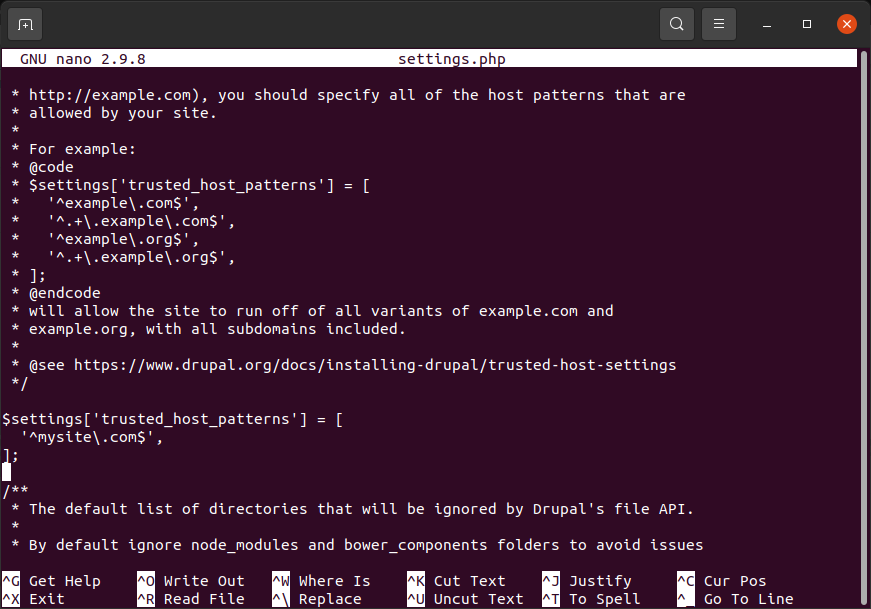
$settings['trusted_host_patterns'] = [
'^mysite\.com$',
'^www\.mysite\.com$',
];
Drupal uses regular expressions to define which hostnames are considered valid.
It's important to add all the site aliases:mysite.comwww.mysite.com... my site alias ...
Summary
The "Trusted Host Settings Not Set" warning is Drupal's way of reminding you to configure an important security feature. By defining trusted host patterns in your settings.php file, you instruct Drupal to accept requests only from your approved domain names, helping prevent Host header attacks and improving your site's overall security.
The fix is straightforward:
1) Open sites/default/settings.php.
2) Add the appropriate trusted_host_patterns entries for your domain(s).
3) Save the file.
4) Clear Drupal's cache.
5) Verify that the warning has disappeared from the Status Report.
Taking a few minutes to configure trusted host patterns is a simple but valuable step toward maintaining a secure and properly configured Drupal website.