
Introduction
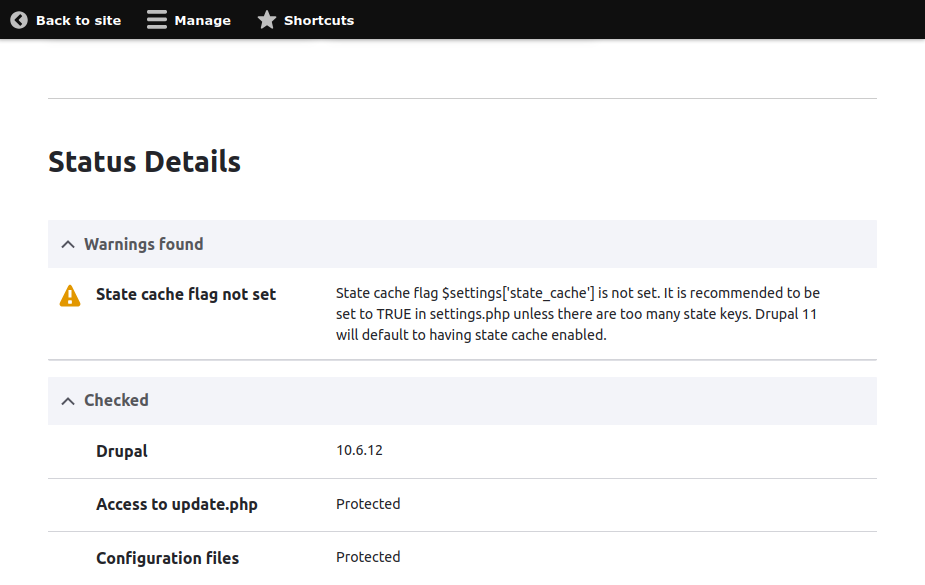
If you have recently updated your Drupal site or run a status report, you might have encountered a warning that looks like this:
State cache flag not set
State cache flag $settings['state_cache'] is not set. It is recommended to be set to TRUE in settings.php unless there are too many state keys. Drupal 11 will default to having state cache enabled.
While this isn't a site-breaking error, it is a crucial performance recommendation that you should address before upgrading to Drupal 11. Here is a quick look at what this warning means and exactly how to fix it.
Understanding the "State Cache Flag Not Set" Warning
In Drupal, the State API is used to store transient system information that doesn't change often (like the last time cron ran, or whether a specific system module is enabled).
Historically, every time Drupal needed to check a state key, it would query the database directly. To drastically improve performance and reduce database overhead, Drupal introduced a feature to cache these state keys in memory.
By default in Drupal 10.x, this feature is optional. The warning appears because your site hasn't explicitly told Drupal whether to use it. However, because this optimization is so impactful, Drupal 11 makes state caching mandatory and enabled by default. Fixing this warning now ensures your site runs faster today and remains fully compatible with future upgrades.
How to Fix the Warning
To resolve this issue, you need to add a single configuration line to your site's settings.php file.
Locate your settings.php file.
Navigate to your Drupal site root folder.
Go to the active configuration directory, which is typically found at: web/sites/default/settings.php
Add the state cache setting (Add to the end of the file)
$settings['state_cache'] = TRUE;
# File: settings.php
$settings['state_cache'] = TRUE;
To resolve this issue, you need to add a single configuration line to your site's settings.php file.$settings['state_cache'] = TRUE;
Required to drop Drupal Cachedrush cr
Summary
Enabling the $settings['state_cache'] flag is a quick, high-reward optimization for your Drupal site. By adding this single line to your settings.php, you reduce unnecessary database queries, speed up page load times, satisfy the Status Report requirements, and future-proof your website for a smooth transition to Drupal 11.