
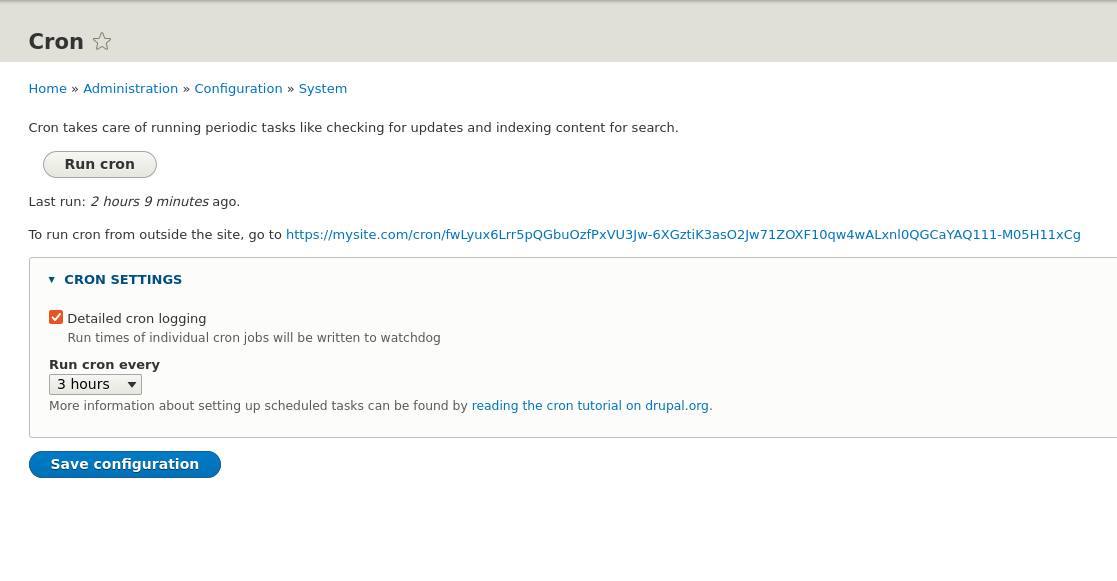
Maintaining a dynamic, high-performing website requires a lot of repetitive background tasks. In Drupal, these automated tasks are handled by a system called Cron. Whether you need to update search indexes, check for security updates, or clear temporary files, setting up cron correctly is essential.
This guide will explain what Drupal cron is, why it is critical for your site, and how to configure it to run seamlessly—even at frequent intervals like every few minutes.
Environment:
Operation system: Ubuntu;
Web Server: Apache2;
Drupal: 11,10,9,8,7
Why is Cron Needed?
In the context of web applications, Cron is a time-based job scheduler. Drupal relies on cron to execute routines that shouldn’t interrupt a user's web browsing experience. Key operations powered by cron include:
- Search Indexing: Re-indexing content so new or edited articles show up accurately in internal site searches.
- Update Verification: Checking for security alerts and core or module updates.
- Queue Processing: Running resource-heavy batch jobs like sending mass emails or cleaning up temporary data.
- Log Maintenance: Trimming database logs to prevent them from growing uncontrollably and slowing down your server.
Without cron, your site's search results will become outdated, queues will pile up, and your site’s health will eventually degrade.
Understanding Your Setup Options
Drupal provides built-in "Automated Cron" (historically known as "Poormanscron"). This mechanism checks if cron needs to run at the end of a standard page request. While convenient, it has two major limitations:
- Imprecise Timing: If your site has low traffic, cron won't run until someone visits the site. Conversely, if you require a tight 5- or 10-minute schedule, standard Drupal UI settings usually restrict intervals to a minimum of an hour.
- Server Load: Running intensive background tasks during user visits can sometimes negatively impact server resources during peak traffic.
To overcome these limits and achieve precise control, you can choose between configuring a real server-level cron job, using settings.php, or using advanced modules.
How to Set Up Cron for Drupal
Depending on your hosting environment and technical needs, you can use the following methods to set up your cron schedule.
Solution: Using the Server's System Crontab (Recommended)
The most reliable method is to offload scheduling to your server’s internal clock using a standard Unix crontab or host management panel (like cPanel).
Find your Cron URL/Token: Log into your Drupal admin dashboard and navigate to Configuration > System > Cron. You will see a unique URL containing a secure cron token (e.g., http://example.com/cron/YOUR_SECRET_TOKEN).
wget -O - -q -t 1 https://mysite.com/cron/fwLyux6VU3Jw-6XGztiK3asO2Jw71ZOXF10qw4wALxnl0QGCaYAQ-M05HxCg
# Example CURL: curl -s -o /dev/null "http://example.com/cron/YOUR_SECRET_TOKEN"
curl -s -o /dev/null "https://mysite.com/cron/fwLyux6VU3Jw-6XGztiK3asO2Jw71ZOXF10qw4wALxnl0QGCaYAQ-M05HxCg"
The following example demonstrates how to trigger the Drupal cron endpoint using wget:
crontab -e
# Enter crontab record & save WGET
*/5 * * * * wget -O - -q -t 1 https://mysite.com/cron/fwLyux6VU3Jw-6XGztiK3asO2Jw71ZOXF10qw4wALxnl0QGCaYAQ-M05HxCg
# Enter crontab record & save CURL
*/5 * * * * curl -s -o /dev/null "https://mysite.com/cron/fwLyux6VU3Jw-6XGztiK3asO2Jw71ZOXF10qw4wALxnl0QGCaYAQ-M05HxCg"
Using Linux command crontab to add the cron record */5 * * * * wget -O - -q -t 1 https://mysite.com/cron/fwLyux6VU3Jw-6XGztiK3asO2Jw71ZOXF10qw4wALxnl0QGCaYAQ-M05HxCg
Run Cron Job every 5 min.
Examples using WGET and CURL.
Alternative Method 2: Bypassing the 1-Hour UI Limit via settings.php
If you rely on Drupal's built-in Automated Cron but need it to trigger faster than the 1-hour interval permitted by the default admin interface, you can override the interval directly in your settings.php file.
Open your /sites/default/settings.php file and append the configuration tailored to your Drupal version (using 300 seconds for a 5-minute interval):
$config['automated_cron.settings']['interval'] = 300;
# For Drupal 7 (Legacy):
$conf['cron_safe_threshold'] = 300;
The setting in Drupal settings.php to run cron in 5-minute interval.
Note: This method still requires page traffic to trigger and will hide the exact interval setting from the administrative user interface.
Summary
Setting up cron is a non-negotiable step in deploying a healthy Drupal website. While the default automated setup is ideal for basic setups, real-world sites frequently require shorter intervals to keep elements like search indexes fresh.
By leveraging Server Crontabs or the settings.php configuration override, you can easily achieve granular schedules (like 1 or 5 or 10 minutes). Just keep server performance in mind: if you notice high resource usage from frequent runs, consider upgrading your setup with the Ultimate Cron module to split up your heavy background tasks.