
Intro
Navigating the world of open-source can be tricky, especially when different systems require specific commands.
If you’ve ever wondered, "What Linux version am I running?" you aren't alone. Identifying your OS release and Linux kernel version is a fundamental skill for every admin and hobbyist. From checking /etc/os-release to mastering the uname -r command, this tutorial breaks down the most effective ways to find your system information across any distro, including Ubuntu, Debian, and CentOS.
What Linux version am I running?
To check your OS version from a command line, you can use built-in system tools or view specific configuration files that store distribution details.
Here are the most common ways to check the OS version:
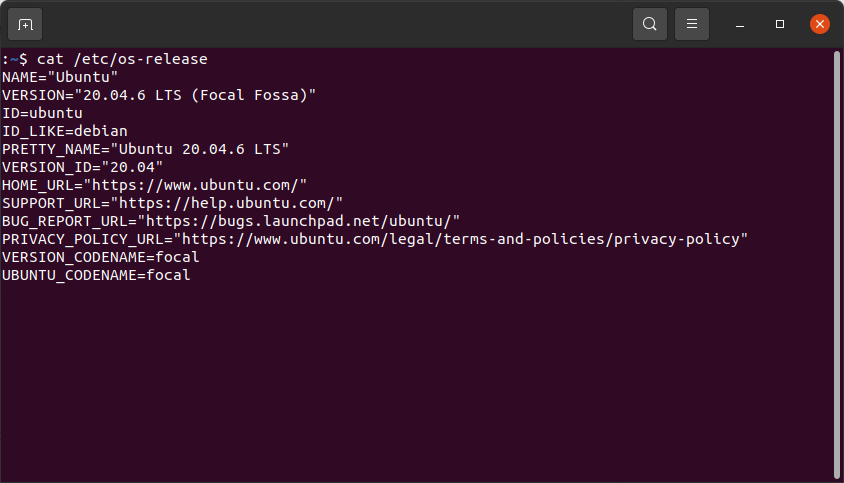
Usage: Command line (CLI)
The standard, modern way to see distribution name, version, and ID.
Usage: Command line (CLI)
Provides a summary of the OS, kernel version, and architecture.
Usage: Command line (CLI)
Displays LSB (Linux Standard Base) information (may require installation).
Usage: Command line (CLI)
Shows the kernel version and system architecture.
Usage: Command line (CLI)
Often used to show the distribution name and version at the login prompt.
Summary
To wrap things up, identifying your Linux environment is a fundamental skill for troubleshooting, installing software, or managing server security. Whether you need the user-friendly details of your Linux distribution or the technical specifics of your kernel version, the command line provides several quick and reliable methods to get the job done.
Summary Checklist:
- For OS Details: Use cat
/etc/os-releaseorhostnamectlfor the most comprehensive distribution info. - For Kernel Details: Use
uname -rto see the exact engine powering your system. - For Universal Compatibility: Stick to cat
/etc/os-release, as it works across almost all modern systemd-based distributions (Ubuntu, Fedora, Debian, etc.).
By mastering these few commands, you ensure that you always have the right system context before making any major configuration changes.