
Introduction
Running heavy or repetitive tasks manually in Drupal isn't scalable. Whether you are clearing caches, importing data feeds, or processing a massive queue, automating these tasks is essential for maintaining a healthy site.
While Drupal has a built-in automated cron system, it runs via web requests, which means it can easily time out on large tasks. The most robust, developer-approved way to handle background tasks is by triggering Drush commands directly via system cron (crontab).
This guide will walk you through why this approach is necessary and exactly how to set it up securely.
Why Run Drush Commands via Cron?
Drush (Drupal Shell) is a command-line interface for Drupal. When you combine it with cron (a time-based job scheduler in Unix-like operating systems), you gain the ability to execute complex backend scripts automatically at specific intervals.
There are three primary reasons to use this method over standard web-based cron:
No Timeout Limits: Web servers (like Apache or Nginx) enforce strict script execution time limits (often 30 or 60 seconds). System-level Drush cron jobs run via the Command Line Interface (CLI), which typically has no time limit.
Memory Efficiency: Running tasks via CLI bypasses the overhead of the web server, freeing up resources to handle actual user traffic.
Granular Scheduling: Instead of running all Drupal maintenance tasks at once, you can schedule specific Drush commands (like drush queue:run) to execute precisely when you want them to (e.g., every 5 minutes, or at 2:00 AM).
How to Set Up Drush Commands in Cron
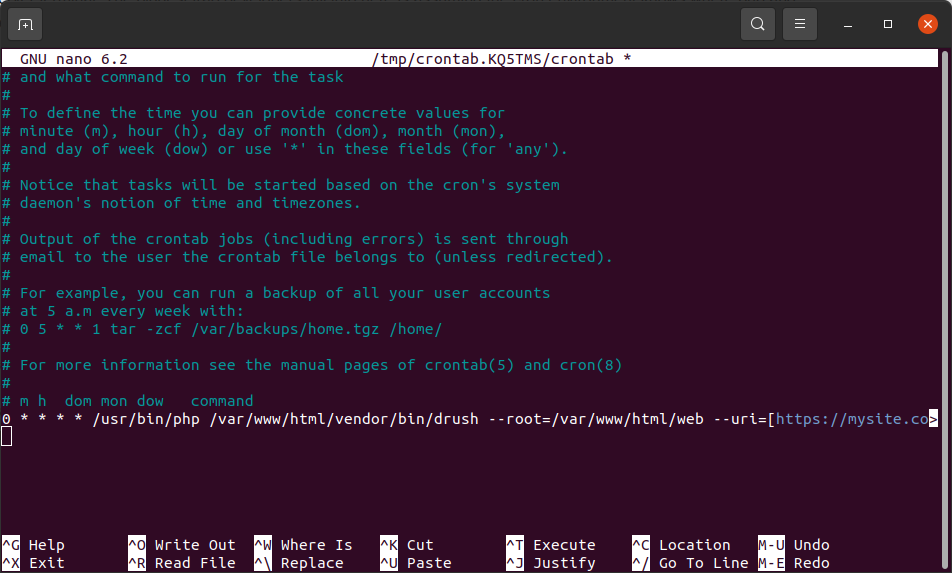
Setting this up requires access to your server terminal. The biggest trap developers fall into here is assuming the cron environment knows where php and drush live. Because cron runs in a stripped-down environment, you must be explicit.
0 * * * * /usr/bin/php /var/www/html/vendor/bin/drush --root=/var/www/html/web --uri=[https://mysite.com] core:cron
Breaking down a Linux cron command can look like a wall of text at first, but it actually follows a very strict, logical anatomy.
Here is exactly what each part of that command tells your server to do, split into the Timing section and the Execution section.
Cron job breakdown:
(0 * * * *)
The Timing Schedule
/usr/bin/php
The absolute system path to the PHP executable
/var/www/html/vendor/bin/drush
The absolute path to your project's Drush executable file.
--root=/var/www/html/web
A Drush configuration flag defining the "Drupal Root".
--uri=[https://mysite.com]
A Drush flag defining the site's URL domain.
core:cron
The specific Drush command being triggered.
Summary
Running Drupal Drush commands via system cron is a best-practice standard for production websites. By shifting heavy lifting from web-facing requests to the background CLI, you prevent performance bottlenecks and ensure that vital tasks like queue processing, data imports, and database updates finish successfully without timeouts.
Just remember the golden rule of server cron jobs: always use absolute file paths for PHP, Drush, and your site root directory.