
Understanding the "Repository Label Changed" Error in Ubuntu
If you’ve been running sudo apt update lately and were met with a wall of red text and "E:" error codes, don't panic. You haven't broken your system.
Specifically, users of the popular Ondřej Surý repositories (the gold standard for updated Apache and PHP packages) are seeing errors stating that the repository changed its "Label" value. This is a security feature of the apt package manager designed to prevent "repository hijacking"—where a malicious actor might take over a URL and change its metadata.
In this case, the change is legitimate and intentional by the maintainer. However, because apt is cautious, it requires you to manually "bless" these changes before it will download any more updates.
Error/Warning:
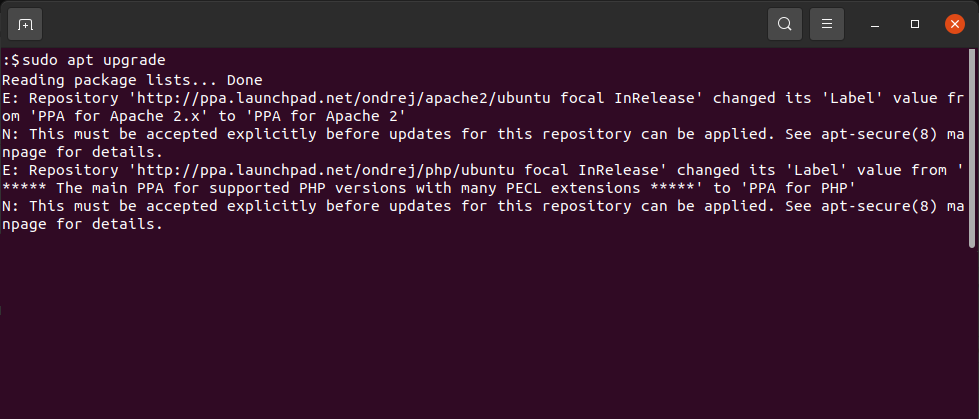
Reading package lists... Done
E: Repository 'http://ppa.launchpad.net/ondrej/apache2/ubuntu focal InRelease' changed its 'Label' value from 'PPA for Apache 2.x' to 'PPA for Apache 2'
N: This must be accepted explicitly before updates for this repository can be applied. See apt-secure(8) manpage for details.
E: Repository 'http://ppa.launchpad.net/ondrej/php/ubuntu focal InRelease' changed its 'Label' value from '***** The main PPA for supported PHP versions with many PECL extensions *****' to 'PPA for PHP'
N: This must be accepted explicitly before updates for this repository can be applied. See apt-secure(8) manpage for details.
Why did this happen?
Under the hood, every repository has a Release file containing metadata. For example:
Old Label: PPA for Apache 2.x
New Label: PPA for Apache 2
Even a tiny change like removing the ".x" triggers a security flag. This ensures that if a repository were redirected to a fake server with different details, your system would stop and ask for permission rather than silently installing potentially compromised software.
How to Fix the "Label Value" Error
To resolve this, you need to tell apt that you trust the new labels. You can't just click "OK" in a popup; you have to run a specific command that triggers the prompt for explicit consent.
The Fix: Using --allow-releaseinfo-change
The most direct way to fix this is to run a targeted update command that tells apt it is okay to accept changes in the repository's metadata.
- Open your terminal.
- Run the following command: sudo apt update --allow-releaseinfo-change
- Review the prompt. The terminal will list the specific repositories (Apache2 and PHP) and ask if you want to accept the new label
- Press 'Y' and Enter.
Once accepted, the metadata is updated on your local machine, and the error will disappear for all subsequent updates.
Your second option is to use --allow-releaseinfo-change
Summary
The "Repository Label Changed" error is a security heartbeat, not a system failure. It’s Ubuntu’s way of saying, "Hey, the description of this source changed; is this still the person you think it is?"
- The Cause: Maintainer Ondřej Surý updated the labels for his Apache and PHP PPAs.
- The Solution: Run sudo apt update --allow-releaseinfo-change.
- The Result: Your package lists will sync, and you can resume installing updates safely.