
Introduction
If you are running a Drupal website on a MySQL, MariaDB, or Percona database, you might occasionally see a warning in your Status Report (/admin/reports/status) regarding your Transaction isolation level.
While your site will technically still run, ignoring this warning can lead to database deadlocks, sluggish performance, and strange errors during high-traffic periods or heavy content updates. Here is exactly what this warning means and how to fix it in less than 5 minutes.
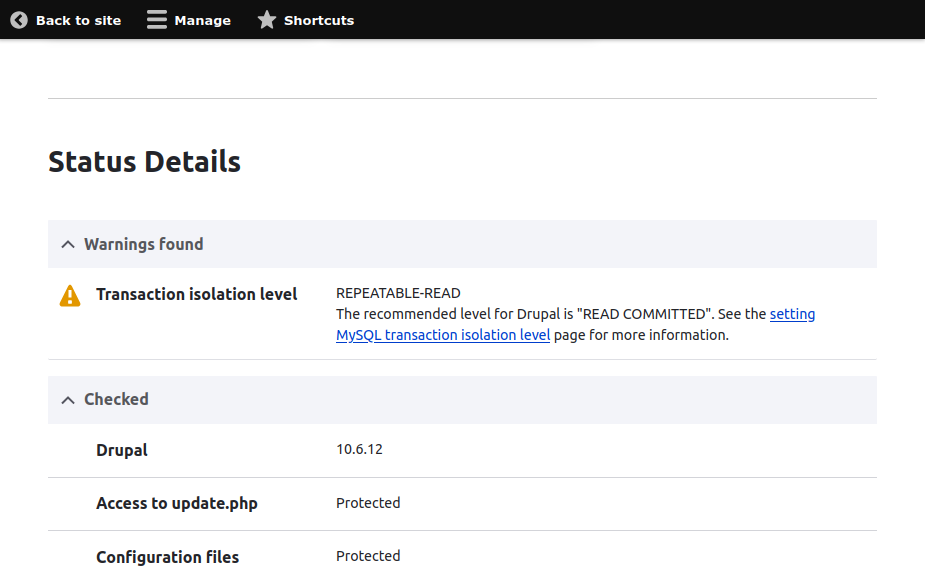
The Warning
Transaction isolation level

REPEATABLE-READ

The recommended level for Drupal is "READ COMMITTED". See the setting MySQL transaction isolation level page for more information.
Understanding the "REPEATABLE-READ" Warning
By default, many MySQL database servers use REPEATABLE-READ as their default transaction isolation level. This setting locks rows during database queries to ensure that if you read data twice within the same transaction, you get the exact same result.
While that sounds safe, Drupal's complex database structure (which handles multiple concurrent reads and writes for caching, sessions, and node updates) struggles under REPEATABLE-READ. It frequently causes database deadlocks—where two processes are waiting for each other to release a lock, eventually crashing the request.
Drupal heavily recommends READ COMMITTED. This isolation level allows a transaction to see data changes as soon as they are committed by another process, dramatically reducing row-locking overhead, preventing deadlocks, and increasing your site's overall speed.
Solution: The Quick Fix via Drupal’s settings.php (Recommended)
You don't need access to your global database configuration files to fix this. You can tell Drupal to explicitly request READ COMMITTED every time it connects to the database.
Navigate to your Drupal root directory and open web/sites/default/settings.php in a text editor.
Scroll down until you find the $databases array definition.
Add the init_commands key inside the database array to force the isolation level on connection.
# PHP
$databases['default']['default'] = [
'database' => 'my_drupal_db',
'username' => 'db_user',
'password' => 'db_pass',
'host' => 'localhost',
'driver' => 'mysql',
// Add the lines below:
'init_commands' => [
'isolation_level' => "SET SESSION TRANSACTION ISOLATION LEVEL READ COMMITTED",
],
];
Add the init_commands key inside the database array to force the isolation level on connection.
In file web/sites/default/settings.php
# /etc/my.cnf
# Ini, TOML
transaction-isolation = READ-COMMITTED
If you manage your own server (VPS/Dedicated/Local) and want all databases to use this optimized setting globally, you can update your MySQL server configuration directly.
Open your MySQL configuration file (usually located at /etc/mysql/my.cnf or /etc/my.cnf).
Look for the [mysqld] section.
Add or modify the following line:transaction-isolation = READ-COMMITTED
Restart your MySQL service (e.g., sudo systemctl restart mysql or mariadb).
Summary
Resolving the "REPEATABLE-READ" warning is a fundamental best practice for maintaining a healthy Drupal site. By switching your transaction isolation level to READ COMMITTED using either your settings.php file or server settings, you eliminate a major bottleneck for database concurrency.
Once you have completed either method, navigate back to your Status Report (/admin/reports/status). The warning should now be gone, replaced by a green checkmark indicating your database is properly optimized for Drupal's architectural needs.